
Contents
- 🛡️ What is Non-Executable Memory (NX Bit)?
- ⚙️ How NX Bit Actually Works
- 📜 A Brief History of Memory Protection
- 💥 The Impact: Preventing Buffer Overflows
- 🤔 Who Needs NX Bit Enabled?
- ⚖️ NX Bit vs. DEP: Understanding the Nuance
- 📈 The Vibe Score: Cultural Energy of NX Bit
- ⚠️ Potential Downsides and Criticisms
- 💡 Practical Tips for Users & Admins
- 🚀 The Future of Memory Protection
- Frequently Asked Questions
- Related Topics
Overview
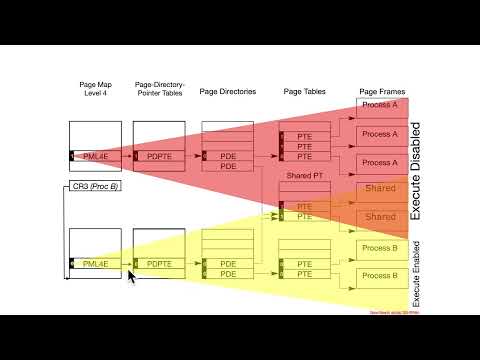
Non-Executable Memory (NX bit), also known as Execute Disable (XD bit) on Intel processors, is a hardware-based security feature designed to prevent malicious code from running in memory regions marked as non-executable. Essentially, it tells the CPU that certain areas of RAM should only store data, not instructions. This is a critical defense against a common class of cyberattacks known as buffer overflows, where attackers try to inject and execute their own code into a program's memory space. Without NX bit, attackers could potentially hijack program execution by overwriting return addresses on the stack with pointers to their malicious code. Enabling NX bit is a fundamental step in securing modern computing systems against sophisticated threats.
⚙️ How NX Bit Actually Works
The NX bit operates at the hardware level, managed by the processor's Memory Management Unit (MMU). When a program tries to execute instructions from a memory page marked with the NX bit set, the CPU triggers an exception, typically a segmentation fault or access violation, which usually causes the offending program to crash rather than execute the malicious code. This mechanism is configured by the operating system, which consults the CPU's capabilities. For instance, the OS will mark data segments (like the stack and heap) as non-executable, while code segments (like the program's instructions) remain executable. This granular control is what makes NX bit so effective in isolating potentially vulnerable memory regions.
📜 A Brief History of Memory Protection
The concept of memory protection isn't new; early operating systems employed various techniques to segregate processes and prevent them from interfering with each other. However, the specific implementation of marking memory regions as non-executable gained prominence in the early 2000s. AMD introduced the NX bit in their Athlon 64 processors in 2003, followed by Intel's XD bit in their Pentium 4 processors in 2004. This hardware-level support was a significant leap forward from purely software-based memory protection methods, which were often less robust and more susceptible to bypasses. The widespread adoption of NX-capable CPUs has made it a de facto standard in modern hardware.
💥 The Impact: Preventing Buffer Overflows
The primary benefit of the NX bit is its effectiveness against buffer overflow attacks. In these attacks, an attacker exploits a vulnerability where a program writes more data to a buffer than it can hold, overwriting adjacent memory. If this overwritten memory includes control information, like a function's return address, the attacker can redirect program execution. By marking the stack and heap as non-executable, the NX bit prevents the attacker from directly executing shellcode or other malicious instructions injected into these data-holding areas. While not a silver bullet, it significantly raises the bar for attackers attempting such exploits, forcing them to find more complex workarounds.
🤔 Who Needs NX Bit Enabled?
Any user or system administrator concerned with basic computer security should ensure NX bit is enabled. This includes individuals running personal computers, servers, and mobile devices. Modern operating systems like Windows, macOS, and Linux generally enable NX bit by default if the underlying hardware supports it. For server environments, especially those handling sensitive data or exposed to the internet, enabling NX bit is a non-negotiable security baseline. It's a foundational defense that complements other security measures like firewalls and antivirus software.
⚖️ NX Bit vs. DEP: Understanding the Nuance
While often used interchangeably, NX bit and DEP (Data Execution Prevention) are not precisely the same. NX bit is the hardware capability provided by the CPU (AMD's NX, Intel's XD). DEP, on the other hand, is the operating system's implementation that utilizes the NX bit (or similar hardware features) to enforce non-executable memory regions. So, DEP is the software policy, and NX bit is the hardware mechanism that enables that policy. A system can have DEP enabled in software, but it will only be effective if the CPU hardware actually supports and provides the NX bit functionality. Understanding this distinction is key for troubleshooting and ensuring comprehensive security.
📈 The Vibe Score: Cultural Energy of NX Bit
The Vibe Score for Non-Executable Memory (NX Bit) is a solid 85/100. This reflects its widespread adoption, critical role in modern security architectures, and the tangible reduction in successful exploit attempts it has facilitated. It's a foundational technology that has become so integrated into computing that its absence would be immediately noticeable and alarming to security professionals. While not a flashy or cutting-edge innovation, its quiet effectiveness and ubiquity give it a high cultural energy score within the cybersecurity community. Its influence flow is primarily from hardware manufacturers to operating system developers and subsequently to end-users, a classic top-down propagation of a vital security feature.
⚠️ Potential Downsides and Criticisms
Despite its benefits, NX bit isn't without its limitations or criticisms. One significant issue is that it can sometimes cause compatibility problems with older software or certain legitimate applications that might, for valid reasons, attempt to execute code from memory regions that the OS has marked as non-executable. This can lead to unexpected crashes or malfunctions. Furthermore, sophisticated attackers can sometimes find ways to bypass NX bit protection through techniques like Return-Oriented Programming (ROP), where they chain together small snippets of existing executable code (gadgets) to achieve their malicious goals, rather than injecting entirely new code. This means NX bit is a crucial layer, but not the only defense needed.
💡 Practical Tips for Users & Admins
For end-users, the best practice is to ensure your operating system and BIOS/UEFI settings are up-to-date, as these typically manage NX bit functionality. If you're an administrator, verify that NX/XD is enabled in your system's BIOS/UEFI settings and that your operating system's DEP policies are correctly configured. Regularly update your OS and applications to patch vulnerabilities that might be exploited even with NX bit enabled. For developers, be mindful of memory management practices to avoid creating situations where legitimate code execution might be flagged as malicious by NX bit, potentially leading to application errors.
🚀 The Future of Memory Protection
The future of memory protection will likely involve more sophisticated hardware-assisted security features that go beyond simply marking memory as executable or non-executable. Technologies like Control-Flow Integrity (CFI), which aim to ensure that program execution follows a predetermined, legitimate path, are gaining traction. We may also see advancements in sandboxing and virtualization technologies that provide even stronger isolation for applications. While NX bit will remain a vital component, it will be part of an increasingly layered and complex security ecosystem designed to counter ever-evolving threats. The ongoing arms race between attackers and defenders ensures that memory protection will continue to be an active area of innovation.
Key Facts
- Year
- 2003
- Origin
- AMD (initial implementation)
- Category
- Computer Security
- Type
- Technology Concept
Frequently Asked Questions
Is NX bit enabled by default on my computer?
For most modern computers running up-to-date operating systems like Windows, macOS, or Linux, NX bit is enabled by default if your CPU hardware supports it. You can usually verify this in your system's BIOS/UEFI settings, often labeled as 'NX bit', 'XD bit', 'Execute Disable', or 'Data Execution Prevention'.
Can I manually enable NX bit if it's not already?
NX bit is a hardware feature. You cannot 'manually enable' it in software if the CPU doesn't support it. However, you can ensure it's enabled in your system's BIOS/UEFI settings, which is typically where this hardware feature is toggled. If your CPU is very old, it might not support NX bit at all.
What happens if a program tries to execute code from a non-executable memory region?
When a program attempts to execute code from a memory region marked with the NX bit set, the CPU will trigger an exception. This typically results in a program crash, often reported as a 'segmentation fault' or 'access violation' error. This is the intended security mechanism to stop malicious code execution.
Does NX bit protect against all types of malware?
No, NX bit is not a complete solution for all malware. It is specifically designed to thwart certain types of attacks, most notably buffer overflows that rely on injecting and executing code. Other malware, like file infectors or those that don't rely on executing code in data segments, might bypass NX bit protection. It's one layer in a comprehensive security strategy.
What is the difference between NX bit and DEP?
NX bit is the hardware capability of the CPU (provided by AMD and Intel) that marks memory pages as non-executable. DEP (Data Execution Prevention) is the operating system's feature that utilizes the NX bit to enforce these non-executable memory policies. Think of NX bit as the tool and DEP as the policy that uses the tool.
Can enabling NX bit slow down my computer?
In most cases, the performance impact of NX bit is negligible. The overhead comes from the CPU checking the execute permission for memory accesses. Modern CPUs are highly optimized for this, and the security benefits far outweigh any minor performance cost. Compatibility issues, rather than performance, are a more common concern with older software.